What does Google look at?
- Relevance. "How well a Business Profile matches what someone is searching for."
- Distance. "How far each business is from the customer who's searching."
- Prominence. "How well-known a business is."

Part 2 of 3: Three reasons a service business goes missing on Google
See where you stand first
Get your Free 3R checkSomeone types "electrician" and the name of your suburb. You are an electrician in that suburb. And you are not there.
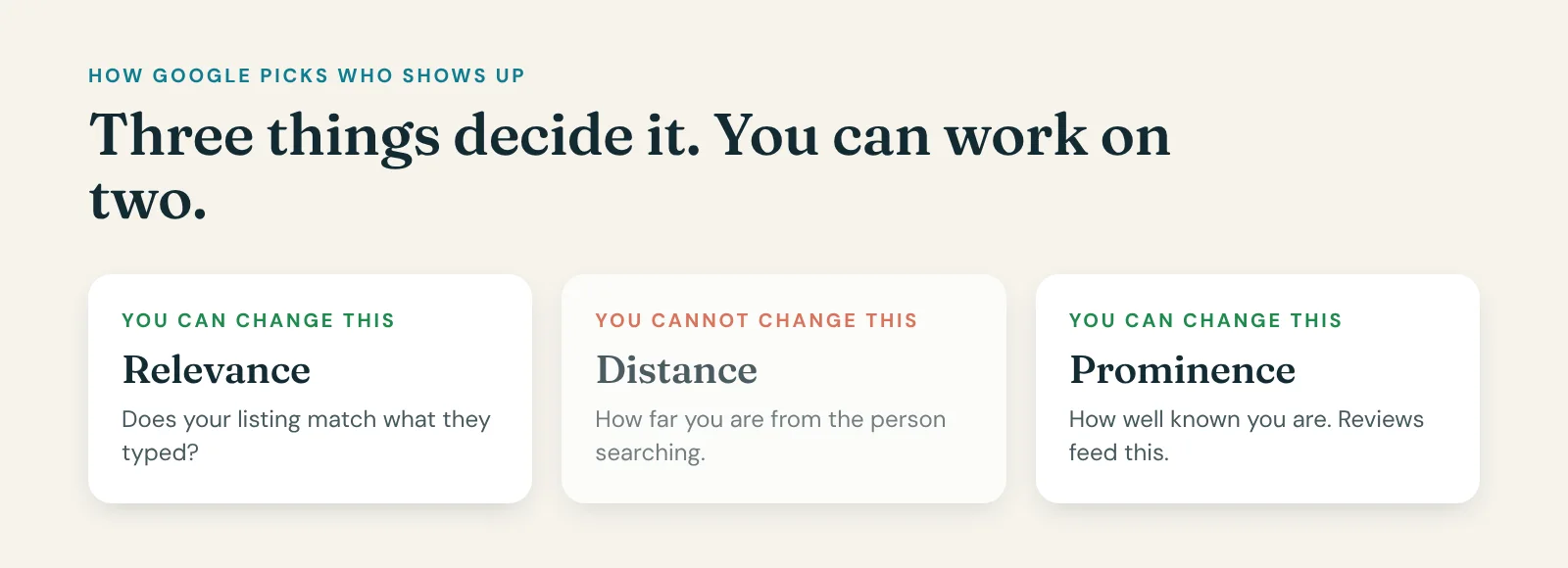
Google is plain about how it decides. It says it looks at three things. How well your listing matches what they typed. How far you are from the person searching. And how well known you are.
You cannot move. So forget distance. Work on the other two.
Matching what they typed. Pick the most specific category for your main service. Not "contractor". "Electrician". List every service you do, in the words your customers use. Set your service areas to the suburbs you really cover. And write a plain description: what you do and where. Google's own words are that if your information is not accurate, your listing might not show up for relevant searches in your area.
Being well known. Google says more reviews and positive ratings can help your local ranking. So every customer gets asked. Every review gets a reply. That is it. There is no trick.
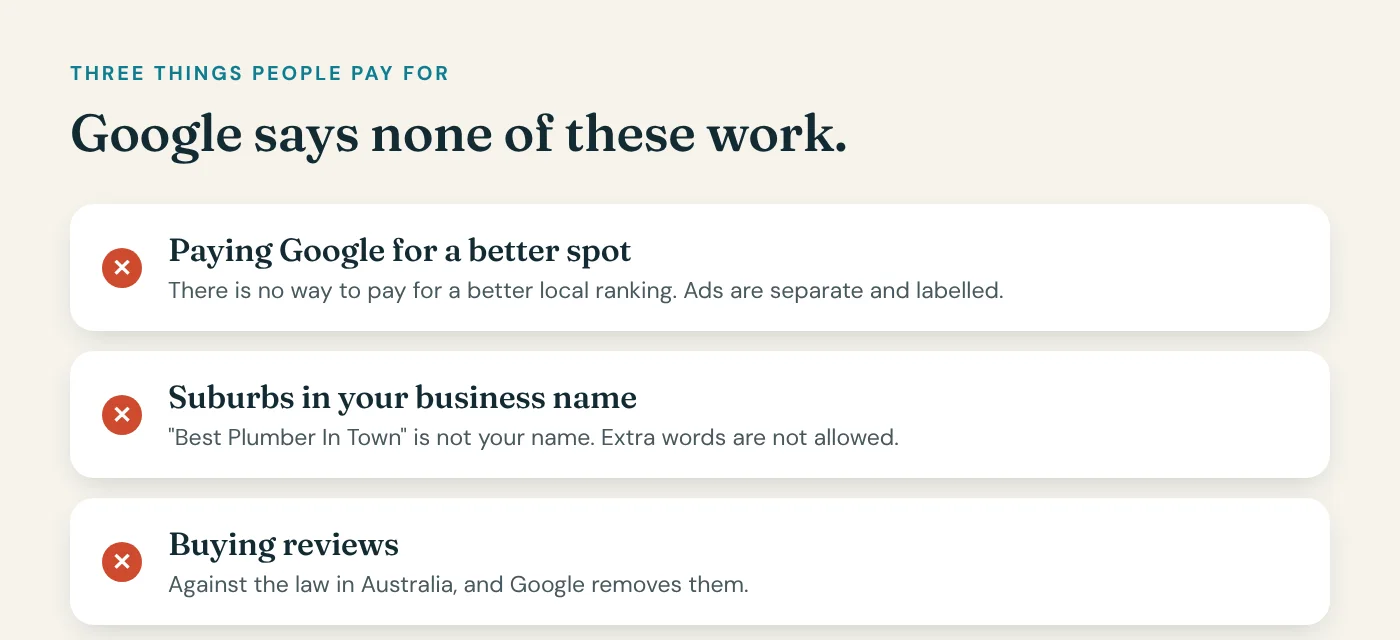
Now the myths. Three things people pay for that Google says do not work.
Myth one: you can pay Google for a better spot on the map. You cannot. Google says so. Ads are a separate thing and they are labelled.
Myth two: put your suburbs in your business name. "Best Plumber In Town" is not your name, and Google says adding words to your name is not allowed. It can get your listing suspended.
Myth three: buy some reviews to get going. It is against the law here, and Google removes them. Real reviews from real customers are the only kind that last.
I spent years working on my sales process. I thought the problem was the pitch. The real problem was nobody was finding me in the first place. Get found first. Search is where people are looking for you. Facebook is you interrupting them.
So check where you actually show up before you spend money on a new website, ads, or an agency.
Reason two. Your listing has to say what you do, the way customers say it, and nothing you can buy beats that.
It is more affordable than most people think. See where you stand first. The Free 3R check is at officestaff.ai.
Google looks at three things: how well your profile matches the search, how far you are from the person searching, and how well known your business is. You can't move, so work on the other two: a complete profile that says what you do, and a steady flow of reviews.
Someone types "electrician" and their suburb into Google. A few businesses show on the map. Here's how Google picks them, in its own words, and what you can do about it.
You'll often show up well near your base and drop off further out. That's distance at work, and it's why your Google Maps ranking changes from suburb to suburb. Check from your customers' suburbs, not just from your desk. See Why is my business not showing up on Google Maps?
Google says "if your business info isn't accurate, your Business Profile might not show up for relevant searches in your area." The full setup is in How do I set up my Google Business Profile properly?
Google says "more reviews and positive ratings can help your business's local ranking." So ask every customer for a review, and reply to every one. See How do I get more Google reviews for my business?
I've spent a lot of my life working on things that didn't move the needle. I'd think I had a funnel problem, but I had a lead problem.
So check where you actually show up before you spend money on a new website, ads or a local SEO agency. A map grid check, searching from points across your service area, shows the real picture. Search is worth the effort. Facebook is interruption marketing. Search is what people are looking for.
The full picture is on our Reach page.
This is part 2 of 3 in Three reasons a service business goes missing on Google. Part of our guide to Reach.
Your business shows up on Google Maps when you search from your own desk. Two suburbs away, it is gone.
That is not a glitch, and it is not bad luck. It is one of three reasons a service business goes missing on Google, and every one of them is on your own Google listing, not your website and not your ads.
One, you show up at your own front door and vanish two suburbs out. Two, your listing does not say what you do the way customers say it. Three, it was set up once, years ago, and nobody has been back.
Fix those three and you are in the race. Here is the first one.
Your business shows up on Google Maps when you search from your own desk. Two suburbs away, it is gone.
That is not a glitch. Google shows a different map to every person, depending on where they are standing when they search.
First, what we are talking about. When someone searches "electrician near me", Google shows a map with three businesses under it. That box is called the map pack. Those three get most of the calls. Everyone else is a tap away on "more places", and most people never tap.
Think about how people used to find a plumber. They opened the Yellow Pages, looked at the first big ad, maybe the second, and rang it. Nobody worked down to the little one at the bottom. The map pack is the same thing with a different cover. The difference is, the Yellow Pages showed the whole town the same page. Google prints a different page for every street.
So when someone tells you "you rank number two", that is not an answer. Number two where? From which street?
The only way to see the truth is a grid of points across the area you actually serve. Say forty-nine points, seven across and seven down, across your suburbs. Run the same search from every point. Green where you are in the top three. Amber where you are shown but fourth to tenth. Red where you are nowhere. Most owners who do this find a small green patch around their own address and red everywhere else. And they have been paying for marketing the whole time.
Here is something that surprises people. A business with a real street address on its listing tends to hold up far better across an area than one that hides it. If you work from home and hide your address, that is allowed. Just know it is not free. You are trading it for reach, so everything else has to work harder.
What most people try first is a new website, or a pack of directory listings, or ads. None of that touches the map. The map runs on three things: your Google listing, how close you are to the person searching, and your reviews.
So before you spend a dollar anywhere else, go through your listing. Your hours, including public holidays. Every service you do, in your customers' words, not the words on your licence. Photos from this year, of your real work. The right main category. Post something, because a listing nobody has touched in two years looks closed. And get your reviews moving, because they feed the map as well as the phone.
Then run the grid again in a month and watch the green spread.
Reason one. You show up at your own front door and vanish two suburbs out, and the fix is your listing, not your website.
It is more affordable than most people think. See where you stand first. The Free 3R check is at officestaff.ai.
That is the first reason, and it is the one you can see once you know to look. The second one is worse, because you cannot see it at all. Your listing is there. It just does not say what you do.
Someone types "electrician" and the name of your suburb. You are an electrician in that suburb. And you are not there.
Google is plain about how it decides. It says it looks at three things. How well your listing matches what they typed. How far you are from the person searching. And how well known you are.
You cannot move. So forget distance. Work on the other two.
Matching what they typed. Pick the most specific category for your main service. Not "contractor". "Electrician". List every service you do, in the words your customers use. Set your service areas to the suburbs you really cover. And write a plain description: what you do and where. Google's own words are that if your information is not accurate, your listing might not show up for relevant searches in your area.
Being well known. Google says more reviews and positive ratings can help your local ranking. So every customer gets asked. Every review gets a reply. That is it. There is no trick.
Now the myths. Three things people pay for that Google says do not work.
Myth one: you can pay Google for a better spot on the map. You cannot. Google says so. Ads are a separate thing and they are labelled.
Myth two: put your suburbs in your business name. "Best Plumber In Town" is not your name, and Google says adding words to your name is not allowed. It can get your listing suspended.
Myth three: buy some reviews to get going. It is against the law here, and Google removes them. Real reviews from real customers are the only kind that last.
I spent years working on my sales process. I thought the problem was the pitch. The real problem was nobody was finding me in the first place. Get found first. Search is where people are looking for you. Facebook is you interrupting them.
So check where you actually show up before you spend money on a new website, ads, or an agency.
Reason two. Your listing has to say what you do, the way customers say it, and nothing you can buy beats that.
It is more affordable than most people think. See where you stand first. The Free 3R check is at officestaff.ai.
So that is reason two. Which brings us to the third one, and it is the most common of the lot. The listing was set up once, years ago, and nobody has been back since.
Most Google listings were set up in an afternoon, years ago, and never touched again. Here is how to set yours up properly, in the order Google cares about.
Your name. Use the name on your van and your invoices. Google says your name should reflect your real-world name, and adding extra words is not permitted. "Best Plumber In Town" is not your name. Tick.
Your category. Google says use as few as possible and make them as specific as possible. "Pest control service", not "contractor". Add others only if they are a real part of the business. Tick.
Your address, or your service area. If customers come to you, show the address. If you go to them, Google says hide it and set a service area. Up to twenty suburbs or postcodes, and Google says keep it to about two hours' drive from your base. Tick.
Your hours, including holidays. Google says confirm your hours for public holidays even if they are the same. Closing for a week or more over Christmas? Mark it temporarily closed, not special hours. Tick.
Verified. If it is not verified, do that first. Google says verifying makes you more likely to show up at all. Tick.
Photos and services. Real photos of your team, your vans, your work. Not stock. Every service you do, in your customers' words. A short plain description. Tick.
Reviews. Ask every customer, reply to every review. Google says it helps your ranking, and the replies show the next customer someone is home. Tick.
Then put a reminder in your phone. The first of every month, check the listing. Hours change. Phone numbers change. Services change. Tick.
Reason three. Set up once and never touched. Eight ticks, one afternoon, and a reminder once a month.
It is more affordable than most people think. See where you stand first. The Free 3R check is at officestaff.ai.
Three reasons. You vanish two suburbs out. Your listing does not say what you do. Nobody has touched it in years.
Every one of them is on your Google listing, not your website, and not your ads. Which means every one of them is fixable this week, for nothing, by you.
Or by us. Local Authority is your listing rebuilt and kept current, your hours right, posts and photos every month, your details fixed across Apple Maps and Bing, and your map checked every month so you can see where you show up. Not software. Work that gets done. For about the cost of a coffee a day.
It is more affordable than most people think. See where you stand first. The Free 3R check is at officestaff.ai.
Subscribe, so the next one finds you.

About the author
Greg Hamlyn started out on the tools and has worked with business owners since 2003. He co-founded OfficeStaff with Nick Lock so local businesses get found, trusted and booked without doing the office work themselves.
Last updated 7 November 2026
Your Google listing, your website and your customer list are yours, always.
Ask us before you start.