Your customer shook your hand, said "great job, I'll leave you a review", and never did.
Not the grumpy ones. The happy ones. There are three reasons, and none of them is that they did not mean it. One, nobody asked, not properly. Two, it was not one tap. Three, they looked at your reviews, saw nobody had ever replied, and thought, why bother.
Fix those three and the reviews you have already earned start showing up. Here is the first one.
The customer said "I'll leave you a review." You believed them. Nothing happened.
Here is what actually happened. They got home. The kids needed dinner. The phone rang. By Thursday your job was a thing that was done, and you were a name they could not quite remember. They did not change their mind about you. They just never got a reminder.
Anyone who has run a service business knows how a good job ends. You pack up, you shake hands, you are already thinking about the next one. Asking for a review at that moment feels awkward, so you do not. And the next morning you are on the tools again and it is gone.
So who in your business asks? If the answer is "me, when I remember", the answer is nobody. Nobody asks, every job, the same way, the day it happens.
Google is plain about this. Its own tips say to remind customers to leave reviews, and to make it easy by sharing your review link. It also says to ask every customer, not only the ones you think will be kind. Picking the happy ones is against the rules, and it looks fake anyway.
What asking properly looks like. It comes from you, with your name on it, not from a number they have never seen. It arrives the same day, while the job is fresh. It thanks them for something real about the job. And it is one tap to your Google page. That is it. No "please rate us five stars". Google does not allow that either. Just: thanks, here is the link, honest words welcome.
Do that for every customer for a month and you will find out how many reviews you have been leaving on the table. For most businesses it is most of them.
Reason one. Nobody asked. Ask every customer, the same day, from you, one tap.
It is more affordable than most people think. See where you stand first. The Free 3R check is at officestaff.ai.
So reason one, nobody asked. Now say you did ask. You sent the link. Still nothing. That is reason two, and it is about what happened when they tapped.
You asked. You sent the link. They tapped it. And then they gave up.
Count the steps. The link opens a page. The page wants them to sign in. They have forgotten the password. It asks which account. Then it wants to know where they are. Then it finally shows the stars. Six steps for a favour they were doing for you. Most people stop at step two.
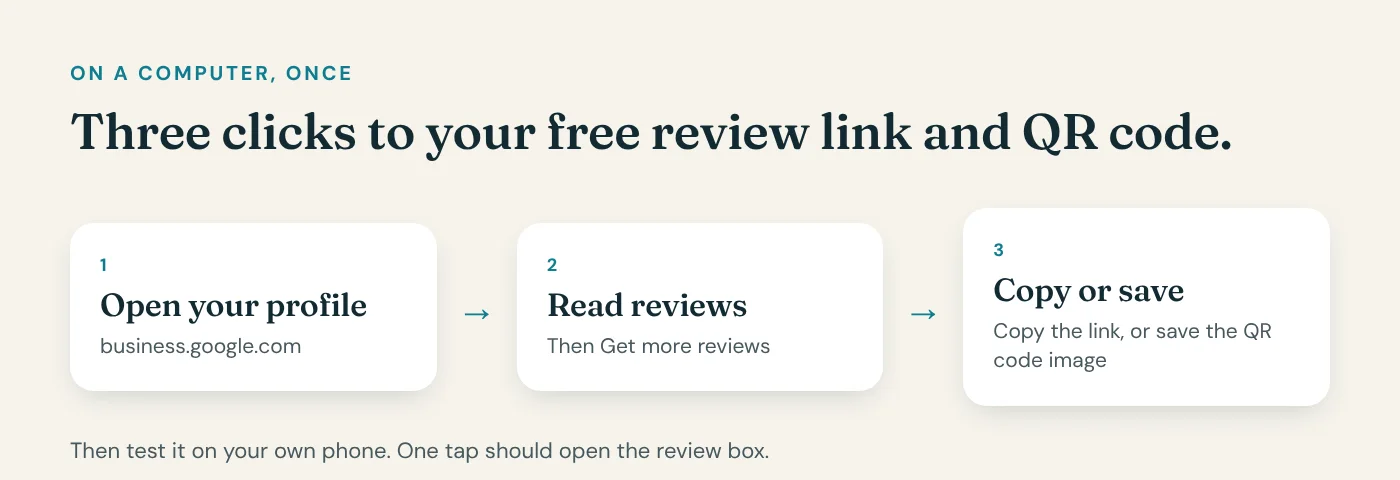
Here is the test. Send your own review link to your own phone, right now, and tap it. If you are not looking at the stars within one tap, neither are your customers.
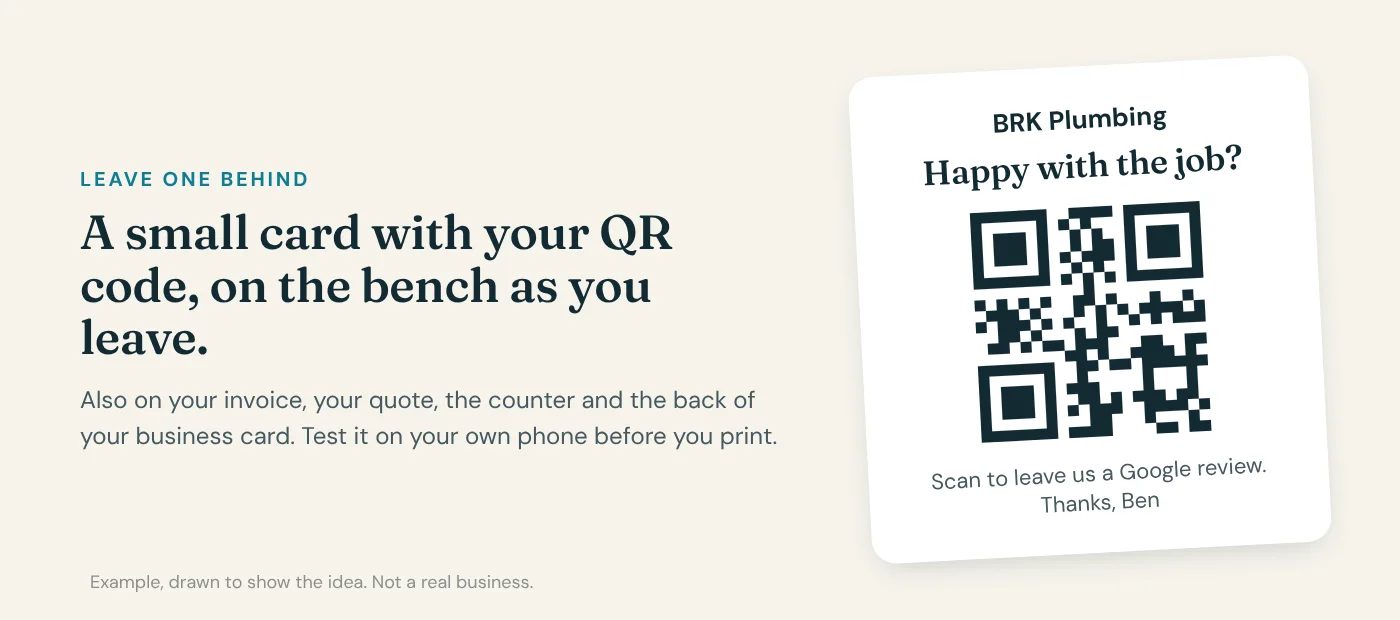
Google gives you a short link for exactly this. In your Google Business Profile, go to Read reviews, then Get more reviews. That link opens straight on the review box for someone already signed in to Google, which is nearly everyone with an Android phone and most people with an iPhone. Use that link. Not your website. Not your Facebook page. Not "search for us on Google". The review box.
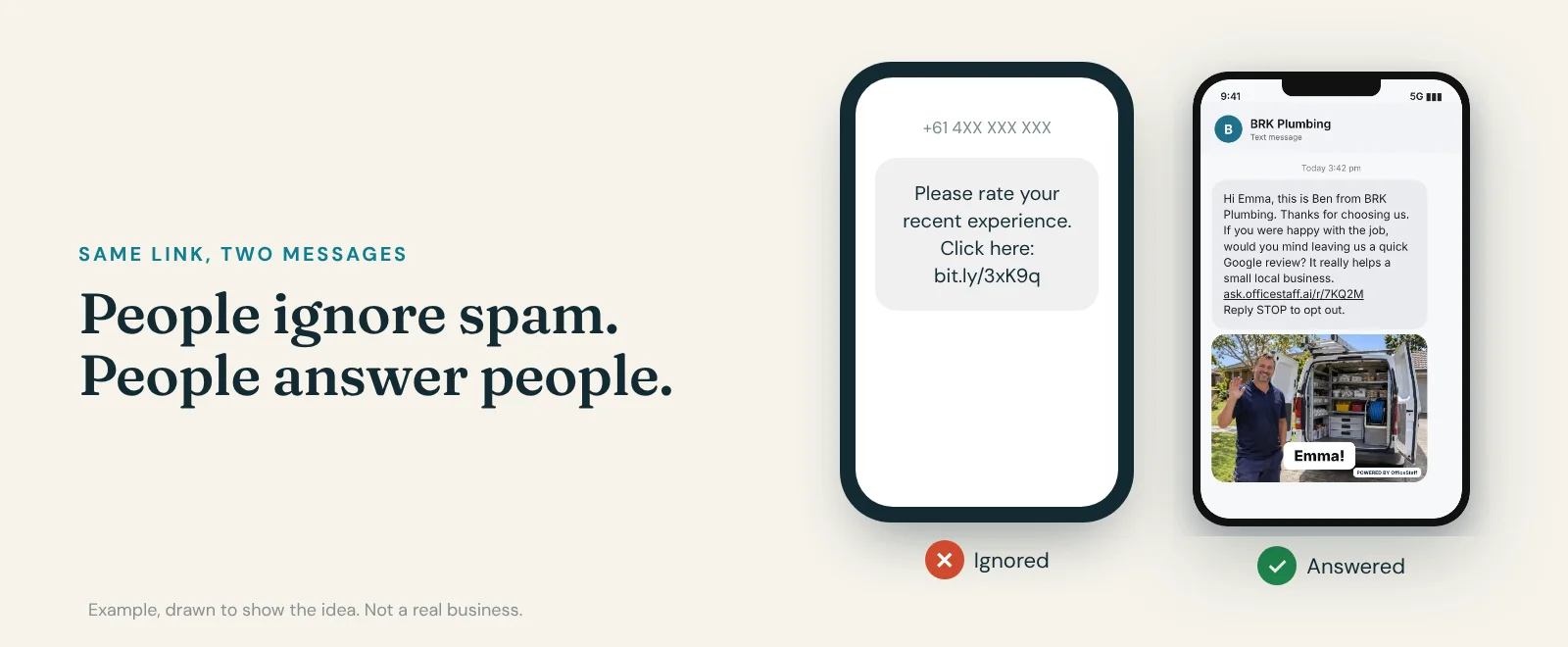
The second thing that stops people is the message itself. On the left: "Please rate your recent experience. Click here: bit.ly, something, something." From a number they do not know. That is what spam looks like, and people have been trained for ten years to ignore it. On the right: a message from you, with your name, about their job, with a plain link. That is a message from a person. People answer people.
And the timing. The same day. Not a week later when the invoice goes out. The job is fresh, the gratitude is fresh, and they are already thinking about you.
One tap, from you, today. That is the whole mechanism.
Reason two. It was not one tap. Use Google's own review link, send it as you, send it today.
It is more affordable than most people think. See where you stand first. The Free 3R check is at officestaff.ai.
That is reason two. One tap, or nothing. The third reason is the one that surprises owners the most, because it is not about asking at all. It is about what your customer saw when they got there.
Your customer tapped the link, landed on your reviews, and read them before they wrote one. Forty reviews. Not one reply.
Forty people spoke to your business and your business said nothing back. So they thought: why would I bother? Nobody is reading these.
Now picture the other version. Every review has a reply. Short, friendly, signed with a name. "Thanks Sarah, glad the new unit got you through the heatwave. Greg." Your customer reads that and thinks: this business actually reads these. Someone is home. And they write.
Google agrees, in its own words. Its help page says that when you reply to customer reviews, it shows that you value their feedback. And its page on local ranking says that more reviews and positive ratings can help your business's local ranking. Replies feed both.
There is one more person reading your replies, and it is not the person who wrote the review. It is the next customer, the one deciding who to ring. A bad review with no reply looks like you do not care. A bad review with a calm reply, "Sorry about the delay on Tuesday, we have fixed the booking system, please give me a call", looks like a business that owns it. That reply is worth more than three more five stars.
How to reply. Good review: thank them by name, mention the job, sign your name. Tick. Bad review: stay calm, never argue, never share their private details, say what you fixed, ask them to call you. Tick. Every review, within a day or two. Tick. Keep it clean, Google checks replies before they go live. Tick.
If you have forty unanswered reviews right now, this weekend is the job. Start with the newest.
Reason three. Nobody replied. Reply to every review, newest first, in your own voice.
It is more affordable than most people think. See where you stand first. The Free 3R check is at officestaff.ai.
Three reasons. Nobody asked. It was not one tap. Nobody replied.
None of them is about your work. Your work is fine. They are about the ten minutes after the job that nobody in a busy business has, and that is why the reviews you earned never showed up.
You can fix all three yourself, this week, for nothing. Ask every customer the same day, from you, with the one-tap link. Reply to every review, newest first.
Or we do it. OfficeStaff Reputation sends the text from you, with your name and your photo, after every job. Every review gets a reply in your voice, and a bad one gets shown to you first. In your first week we ask the customers you already have. Not software you learn. Work that gets done. For about the cost of a coffee a day.
It is more affordable than most people think. See where you stand first. The Free 3R check is at officestaff.ai.
Subscribe, so the next one finds you.